iStudio Webinar Customization
description: Customization Of Web & Mobile Interfaces
iStudio Webinar Customization
Customization of Webinar Page ( For External Viewers)
The webinar consists of following pages:
- A Login Page where the viewer lands
- You can customize the Logo on Top Left or Top Right
- You can also Choose what are the options available for login
- Choose User id- Email ID Or Employee ID
- Common or Unique Password( Please talk to your account Manager)
- Branch id or any other unique field
- The Inner Player Page where the webcast is played
- This page has two major components
- A Central Player where the actual webcast shall play
- Pre / Post webcast Image/Video
- Image which shall be placed PRE webcast time( before the event is started) - (Width 1280px X height 750px / Web 16:9 Ratio / Mobile - 9:16 ratio)
- Image which can be placed POST Webcast Time ( after the event has ended) - (Width 1280px X height 750px / Web 16:9 Ratio / Mobile - 9:16 ratio)
- Actual webcast Stream
- Web : This Player typically is at center of the page but if you want you can request your account manager to keep it as 98% of the page. Player Dimensions are 16:9
- Mobile - The player automatically changes to Landscape View and hence the player typically adjusts itself
- Pre / Post webcast Image/Video
- A background page which can be customized
- You can chose to provide a Background Image - (Width 1280px X height 750px / Web 16:9 Ratio / Mobile - 9:16 ratio)
- You can also provide a Background Video - (Width 1280px X height 750px / Web 16:9 Ratio / Mobile - 9:16 ratio)
- A Central Player where the actual webcast shall play
- Important notes:
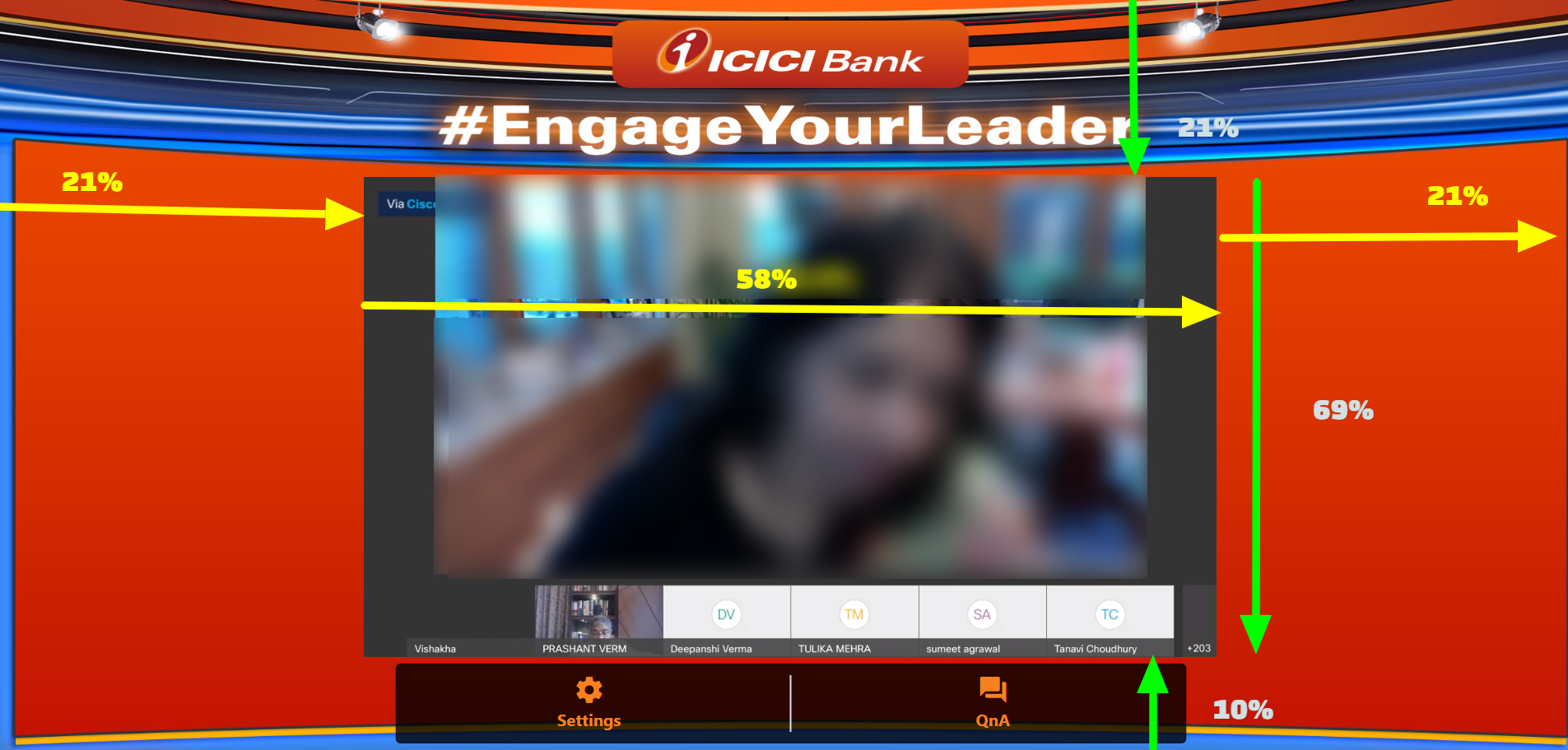
- Sometimes The background Image or Video contains certain graphics which can be hidden by the Player. In such cases, please find approx dimensions which should be adhered to , which ensures that background header /footer does not get shadowed by the player.